Fuse CATS Genlock Tester User Manual
The Fuse CATS Genlock Tester is a portable diagnostic tool designed to analyze video genlock signals (bi-level and tri-level sync). It operates in two modes: Handheld Mode for quick visual confirmation and Tethered Mode for detailed statistical analysis via a Web UI.
1. Handheld Mode
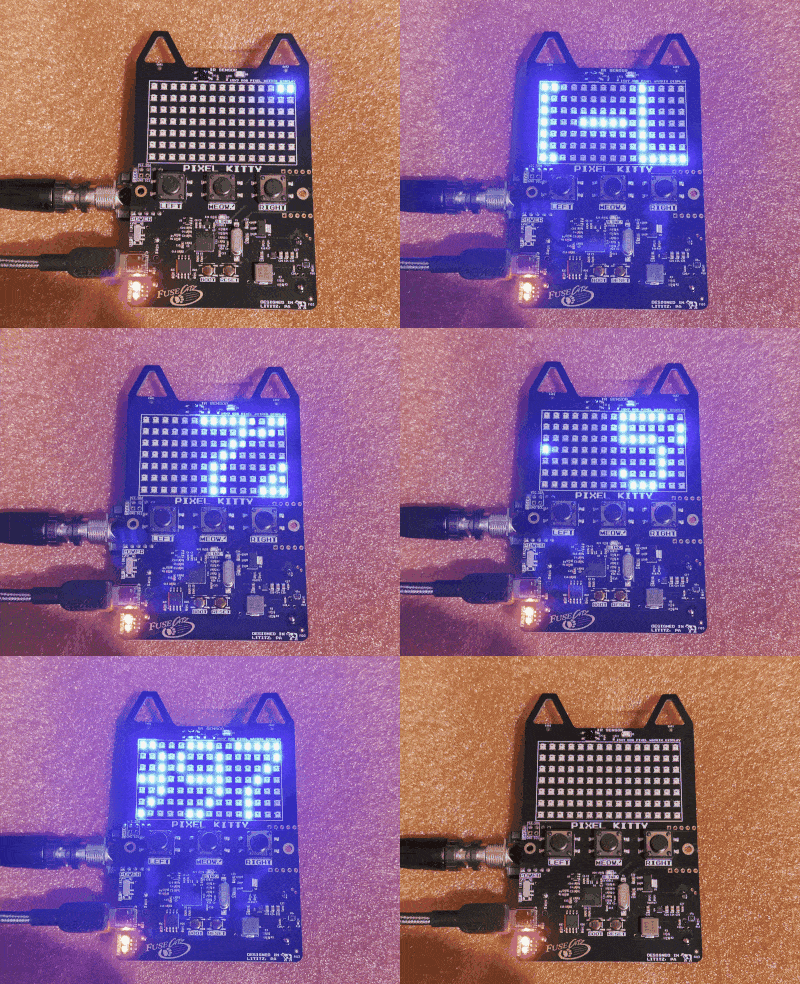
In Handheld Mode, the device operates autonomously using its built-in LED matrix display. Simply connect a genlock source (via the BNC connector) and the display will show the signal status.
Status Colors
The LED text color indicates the detected signal type:
- RED: NO LOCK
- No valid video sync signal detected.
- GREEN: NTSC
- Standard Definition Bi-level Sync (approx. 525 lines).
- YELLOW: PAL
- Standard Definition Bi-level Sync (approx. 625 lines).
- BLUE: 720p / 1080p
- High Definition Tri-level Sync (Progressive).
- MAGENTA: 1080i
- High Definition Tri-level Sync (Interlaced).
- WHITE: Unknown SD/HD
- Valid sync signal detected, but line count does not match standard broadcast formats perfectly.
Display Text
The text scrolls from right to left, displaying:
[TYPE] [FORMAT] [FPS]Hz
- Example:
TRI-LVL 1080p 60.000Hz - Example:
BI-LVL NTSC 29.970Hz
2. Tethered Mode (Web UI)
For deep analysis, connect the device to a computer via USB. The Web UI provides real-time jitter statistics and format details.
IMPORTANT
Browser Requirement: You must use Google Chrome or Microsoft Edge because this tool relies on the Web Serial API. Firefox and Safari are currently not supported.
Connection Steps
- Connect the Fuse CATS Genlock Tester to your computer via USB.
- Open the Genlock Tester Web Interface (open
index.htmlin Chrome/Edge). - Click the CONNECT DEVICE button in the top right.
- Select your device (e.g., "pico") from the popup list and click Connect.
- Verification: The Status bar should turn green and say CONNECTED.
Dashboard Overview
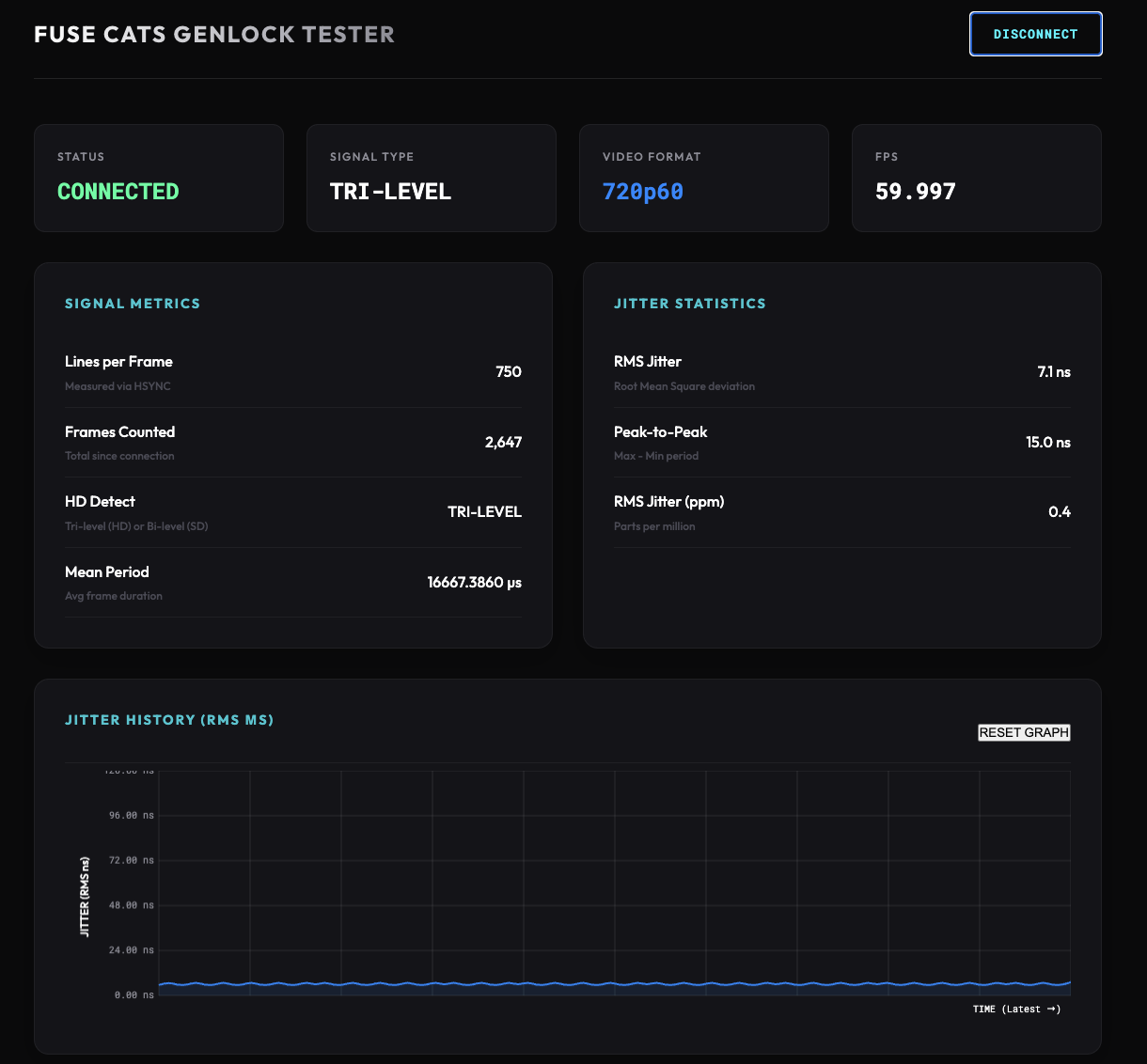
The dashboard is divided into three sections:
A. Status Bar (Top)
Provides an immediate summary of the signal:
- STATUS: Connection state (CONNECTED / DISCONNECTED).
- SIGNAL TYPE:
TRI-LEVEL,BI-LEVEL, orNO LOCK. - VIDEO FORMAT: Detected standard (e.g.,
1080p60,NTSC). - FPS: Measured frames per second (e.g.,
59.940).
The jitter statistics functionality is currently in beta. Please use these values as relative indicators of stability rather than absolute science.
B. Signal Metrics & Jitter Statistics (Middle)
A detailed technical readout:
- Lines per Frame: The raw number of horizontal lines counted between vertical syncs.
- HD Detect: Hardware verification of Tri-level (HD) vs Bi-level (SD) pulses.
- Mean Period: The average duration of a single frame in microseconds (µs).
- RMS Jitter: The root-mean-square deviation of frame timing. Lower is better / more
stable.
- Values < 1.0µs are displayed in nanoseconds (ns).
- Peak-to-Peak: The difference between the longest and shortest frame detected.
- RMS Jitter (ppm): Jitter expressed as Parts Per Million relative to the frame rate.
C. Jitter History Graph (Bottom)
Visualization of signal stability over time:
- Y-Axis: Jitter (RMS) in microseconds (µs) or nanoseconds (ns).
- X-Axis: Time (showing the last 100 samples).
- Line Color: Matches the signal type color (Blue for HD, Green for NTSC, etc.).
- Behavior: The graph updates in real-time. If the signal format changes, the graph automatically resets.
Troubleshooting
- "NO LOCK" but signal is present: Check your cable and ensure the signal level is standard broadcast voltage (1V p-p or similar).
- Web UI not connecting: Ensure no other software is using the USB port. Close the tab and reopen it to reset the Web Serial permission.